News

A Complete Guide to Acronis Backup to Cloud

acronis backup to cloud

Data is one of the most valuable assets for businesses of all sizes. Whether you run a small startup or a large enterprise, protecting your data from loss, cyberattacks, or accidental deletion is critical. This is where Acronis backup to cloud becomes a game-changer.

With advanced security features, flexible storage options, and seamless automation, Acronis cloud backup offers one of the most reliable solutions for modern data protection needs. In this blog, we will explore everything you need to know about Acronis cloud backup, including its features, benefits, cost, setup process, and why it stands out in the market.

One of the most trusted solutions in this space is acronis backup to cloud, offered by Acronis. This advanced platform enables businesses to securely back up their data to the cloud while integrating powerful cybersecurity features. Unlike traditional backup tools, acronis backup to cloud combines data protection with threat prevention, ensuring that your information is not only stored safely but also protected against modern cyber threats like ransomware and malware.

What is Acronis Backup to Cloud?

acronics cloud backup

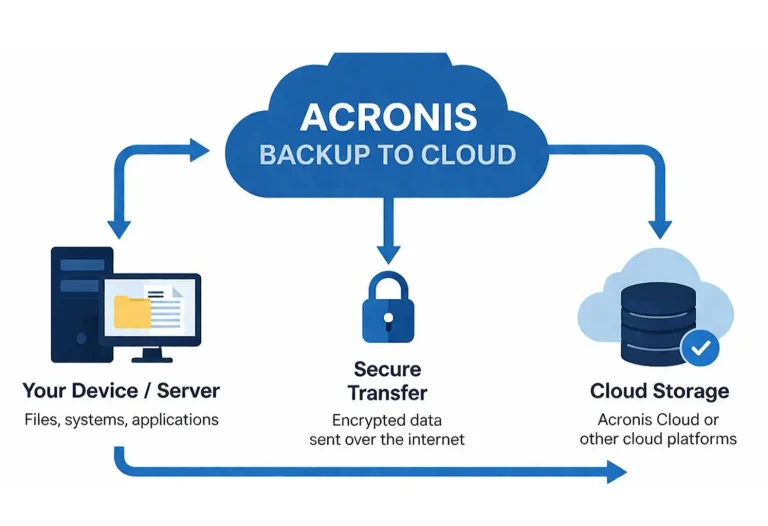
Acronis backup to cloud is a powerful data protection service that allows businesses and individuals to securely store their data in the cloud. Instead of relying on physical storage devices, users can back up files, applications, and entire systems to remote servers managed by Acronis.

Acronis Backup to Cloud is a comprehensive, secure, and scalable data protection solution designed to safeguard business-critical information by storing backups in the cloud. It enables organizations to automatically back up files, systems, applications, and virtual environments to a remote, encrypted cloud storage, ensuring data is always protected from unexpected loss.

This ensures:

  • Data is safe from hardware failures
  • Protection against ransomware attacks
  • Easy recovery anytime, anywhere

The Acronis cloud backup solution is designed to deliver both backup and cybersecurity in one platform, making it a preferred choice for IT professionals and businesses.

What is Acronis Backup and recovery?

Acronis Backup and recovery

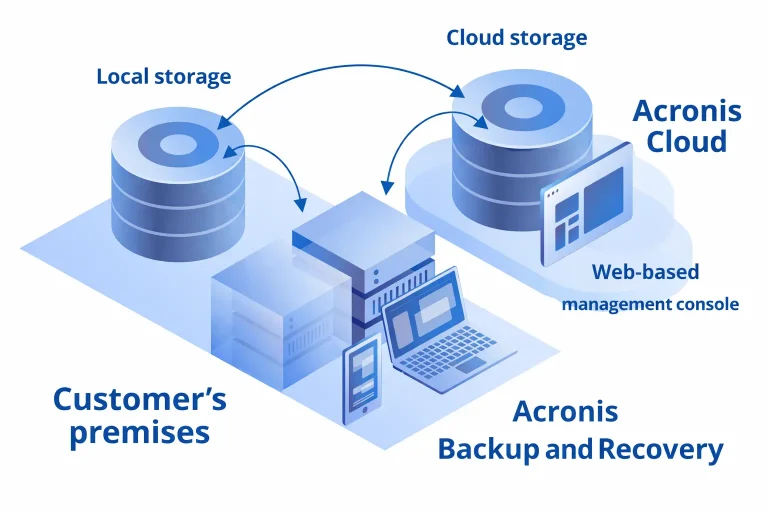
Acronis Backup & Recovery is a comprehensive data protection solution designed to help businesses and individuals safeguard their critical data, systems, and applications. Acronis Backup & Recovery is software that creates secure copies (backups) of your files, operating systems, and entire machines. If data is lost due to hardware failure, cyberattacks, or accidental deletion, you can quickly restore it to its original state.

Key Features

  • Full Image Backup – Captures everything, including OS, applications, and files
  • Cloud & Local Backup – Store data on cloud storage or physical devices
  • Fast Recovery – Restore entire systems or individual files in minutes
  • Ransomware Protection – Built-in security to prevent unauthorized encryption
  • Flexible Scheduling – Automate backups daily, weekly, or in real-time

Comparing Acronis with Other Backup Solutions

FeatureAcronisTraditional Backup
Cloud BackupYesLimited
CybersecurityBuilt-inSeparate tools needed
AutomationAdvancedBasic
ScalabilityHighModerate
Recovery SpeedFastSlower

Acronis clearly stands out as a comprehensive acronis backup to cloud.

Key Features of Acronis Cloud Backup

Advanced Data Protection

Acronis provides full-image and file-level backups, ensuring complete data protection. You can restore entire systems or specific files depending on your needs.

Unlike traditional backup tools, Acronis cyber protect cloud backup includes built-in anti-ransomware, antivirus, and malware protection

You can store data in:

  • Acronis Cloud
  • Local storage
  • Hybrid environments

This flexibility makes acronis backup to cloud ideal for businesses using SaaS platforms.

Set schedules and automate backups to avoid manual intervention. This ensures your data is always up-to-date

Quick data restoration minimizes downtime and keeps your business operations running smoothly

Why Businesses Choose Acronis Cloud Backup

Reliability

Acronis offers high uptime and dependable performance, making it a trusted solution globally

With end-to-end encryption, your data remains secure during transfer and storage

Whether you are a small business or a large enterprise, the solution scales according to your needs.

Helps meet industry standards and data protection regulations.

Acronis Cloud Backup Solution: Use Cases

Affordable and easy-to-use backup solution without needing a large IT team.

Advanced features like centralized management and multi-workload protection.

MSPs can offer acronis cloud backup support to their clients as a managed service.

Protects devices and data of employees working remotely.

Understanding Acronis Cloud Backup Cost

One of the most common questions is about acronis backup to cloud cost. The pricing depends on several factors:

  • Storage size required
  • Number of devices
  • Type of workloads (servers, VMs, endpoints)
  • Additional security features

General Pricing Structure

  • Pay-as-you-go model
  • Subscription-based plans
  • Custom pricing for enterprises

While Acronis may not be the cheapest option, its combination of backup and cybersecurity makes it a cost-effective investment.

Acronis Cloud to Cloud Backup Explained

Acronis backup to cloud is a solution that protects data stored in one cloud platform by backing it up to another secure cloud environment. Provided by Acronis, this service ensures that your SaaS data remains safe, accessible, and recoverable at all times.

Unlike traditional backups that focus on local systems or servers, cloud-to-cloud backup specifically targets cloud applications, ensuring that even cloud-native data is protected against unexpected loss.

Modern businesses rely heavily on cloud applications like Microsoft 365 and Google Workspace. acronis backup to cloud ensures that data stored in these platforms is also protected.

Benefits:

  • Backup emails, files, and contacts
  • Protect against accidental deletion
  • Recover lost data quickly
  • Ensure compliance

This feature is especially useful for organizations managing large volumes of cloud data.

How to Perform Acronis Backup to Setup

Setting up acronis cloud backup is straightforward. Follow these steps:

Create an Account:  Sign up with Acronis or a service provider offering their solutions.

Install the Agent:  Download and install the Acronis backup agent on your system.

Configure Backup Plan
Choose:

  • Files or full system backup
  • Backup schedule
  • Storage location

Start Backup: Run the backup manually or let it run automatically based on your schedule.

Monitor and Manage:Use the dashboard to monitor backup status and manage your data.

Acronis Cyber Protect Cloud Backup: A Complete Package

Acronis cyber protect acronis backup to cloud goes beyond traditional backup solutions by integrating cybersecurity features.

Key Capabilities:

  • AI-based ransomware protection
  • Vulnerability assessments
  • Patch management
  • Secure backup storage

This all-in-one approach reduces the need for multiple tools, saving both time and money.

Benefits of Acronis Backup to Cloud

  1. Data Security: Your data is encrypted and protected against cyber threats.
  2. Business Continuity: Quick recovery ensures minimal downtime during disasters.
  3. Cost Efficiency: Eliminates the need for expensive hardware.
  4. Ease of Use: User-friendly interface makes it accessible even for non-technical users.
  5. Remote Accessibility: Access your backups from anywhere in the world.

Acronis Cloud Backup Support

Reliable acronis backup to cloud support is essential for smooth operations.

Support Options:

  • 24/7 technical support
  • Knowledge base and documentation
  • Live chat and email assistance
  • Dedicated account managers (for enterprises)

Good support ensures quick resolution of issues and uninterrupted service.

Best Practices for Using Acronis Cloud Backup

To maximize the benefits:

  • Schedule regular backups
  • Use encryption for sensitive data
  • Test recovery processes periodically
  • Monitor backup logs
  • Keep software updated

Common Challenges and Solutions

Storage Costs : Optimize storage by removing unnecessary backups.

Slow Backup Speed: Use incremental backups instead of full backups.

Configuration Issues
Solution: Seek acronis cloud backup support for proper setup.

Future of Cloud Backup with Acronis

The future of acronis backup to cloud looks promising with advancements in:

  • AI-driven threat detection
  • Automation and analytics
  • Multi-cloud integration
  • Enhanced data privacy

As businesses continue to move towards digital transformation,acronis backup to cloud solutions like Acronis will become even more essential.

Conclusion

In an era where data loss can lead to significant financial and reputational damage, investing in a reliable backup solution is no longer optional. Acronis cloud backup offers a powerful combination of data protection, cybersecurity, and scalability.

From small businesses to large enterprises, acronis backup to cloud provides a flexible and secure way to safeguard critical data. With features like automated backups, cloud-to-cloud protection, and advanced security, it stands out as one of the best solutions in the market.

If you are looking for a dependable acronis backup to cloud solution, now is the perfect time to explore its capabilities and secure your digital assets.

About the Author