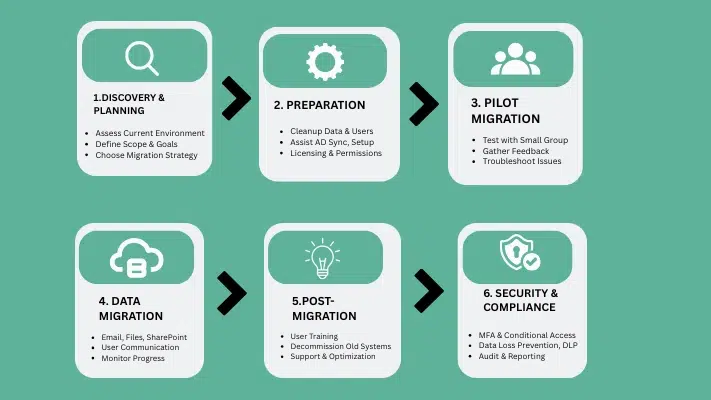
Migrating to Microsoft 365 has quickly become a top priority for organizations looking for secure communication, seamless collaboration and operational agility. As businesses expand and workloads change, their need for a dependable cloud environment becomes undeniable. Microsoft 365 delivers enterprise-grade security, built-in compliance measures, modern productivity apps and reliable service availability – making it one of the world’s most trustworthy platforms. Migration offers numerous advantages; however, its execution must be carried out with care to minimize downtime, data loss or workflow disruptions. Following industry best practices ensures an orderly migration. This guide details proven migration methods, downtime-reduction strategies and provides a practical checklist to enable IT teams and decision-makers to transition with confidence to Microsoft 365.
Why Companies Are Migrating to Microsoft 365
Microsoft 365 has become the go-to solution for modernizing communication and collaboration systems within organizations, offering real-time co-authoring, improved email reliability and seamless device integration as productivity benefits. Global cloud adoption rates continue to surge; companies increasingly opting for SaaS models due to reduced maintenance overhead costs. Microsoft provides industry leading uptime guarantees, advanced security features and compliance certifications making M365 an appealing option for organizations to migrate legacy systems onto M365.
Productivity benefits: – Microsoft 365 enhances productivity with cloud-hosted tools such as Exchange Online, Teams, SharePoint, and OneDrive. Users gain continuous access to email, files, and collaboration apps from any device, improving efficiency across distributed teams.
Cloud adoption trends: – Organizations are increasingly transitioning to cloud-based platforms due to scalability, reduced IT infrastructure costs, and faster application deployment cycles.
Microsoft’s documentation on reliability and security: – Microsoft provides financially backed uptime guarantees, multi-layered security architecture, and global compliance standards to ensure a secure, stable operating environment.
What Microsoft 365 Migration Includes: Mailboxes, Files, Identities & DNS
Successful Microsoft 365 migration requires an in-depth knowledge of both data and services being transferred, typically including migrating mailboxes to Exchange Online for superior security, storage quota increases and improved reliability; migrating SharePoint file repositories with permissions and collaboration structures over to OneDrive; migrating user identities through identity/licensing configuration; setting up DNS domain names to facilitate mail flow with authentication as part of DNS and domain setup – each component plays an essential role in guaranteeing an easy transition into Microsoft 365! Each component plays an essential part in guaranteeing an easy transition into Microsoft 365!
Exchange Online migration: – Migrating mailboxes to Exchange Online includes moving emails, calendars, contacts, and associated permissions. Proper planning ensures that all data remains intact and accessible after cutover.
SharePoint/OneDrive migration: – File migration involves transferring documents, libraries, site structures, and user access, while also optimizing storage and ensuring compliance with Microsoft’s file-handling guidance.
Identity, licenses, DNS, domains: – Correct identity mapping, DNS configuration, and licensing ensure uninterrupted user access and secure authentication post-migration.
Microsoft 365 Migration Methods Explained (Cutover, Staged, Hybrid, IMAP)
Microsoft provides different migration pathways tailored to different organisation sizes and technical environments. Selecting an effective method is key to minimizing downtime while guaranteeing an enduring migration result. Cutover migration works best for smaller organizations with few mailboxes; staged migration provides greater control in larger environments requiring staged changes. Hybrid migrations are ideal for large or complex organizations, offering maximum mailbox throughput while coexisting between on-premises and cloud systems. IMAP migration options support systems not natively integrated with Exchange; selecting an efficient method ensures efficiency, data integrity, and minimal disruptions.
Cutover Migration for Small Businesses
Cutover migration allows all mailboxes, contacts, and groups to be transferred at once. It is best for organizations with fewer mailboxes and simpler environments. Cutover minimizes technical complexity but does require a full switch-over at a scheduled time.
Staged Migration for Medium-Sized Organizations
Staged migration moves mailboxes in batches over a defined period. It suits organizations that need a phased transition and allows partial coexistence until all users are fully migrated.
Hybrid Migration for Large Enterprises (Best Throughput)
Hybrid migration integrates on-premises Exchange with Microsoft 365, enabling high-speed mailbox transfers and long-term coexistence. It is ideal for large enterprises that require advanced control, flexibility, and minimal user disruption.
IMAP and Third-Party Migration Options
IMAP migration supports mail-only transfers from non-Exchange systems, while third-party tools help migrate calendars, contacts, and permissions for platforms like Google Workspace or legacy servers.
What Causes Downtime During a Microsoft 365 Migration? (Technical Breakdown
Downtime during migration can arise for various technical reasons, particularly when transitioning from legacy environments to cloud services. DNS propagation delays may temporarily interrupt delivery disruptions; outlook clients may require profile updates or reconfiguration, leading to brief user downtime; data synchronization windows can snarl large mailbox transfers when delta sync is due, while routing changes could temporarily hamper ingoing or outgoing email flow – understanding these common downtime triggers allows IT teams to plan mitigation steps ahead of time and ensure service continuity.
DNS Propagation: – DNS updates require time to replicate globally, potentially affecting mail delivery as MX records transition.
Outlook profile rebuilds: – When moved to a new server, some users must recreate Outlook profiles to connect to Exchange Online.
Data sync windows: – Large mailbox migrations may require delta synchronization, temporarily affecting data availability.
Re-routing mail: – Mail flow may shift between on-premises and cloud systems during cutover, causing brief interruptions.
Best Practices for a Smooth, Zero-Downtime Microsoft 365 Migration
Follow proven migration practices to keep users comfortable during a move while protecting data during it. Implement a pilot migration to identify any problems early; use a phased approach so as not to affect too many users at one time and reduce risks; keep email services available during transition with gradual syncing making for quicker final switches; adhere to Microsoft SharePoint/OneDrive guidelines to boost file transfer performance, especially beneficial in larger companies; use hybrid migration as it’s reliable while coexisting smoothly – this ensures smooth migration with minimal downtime! Put these practices in place will result in smoother migration with minimal downtime!
Start With a Pilot Migration (Microsoft Recommended): – A pilot migration allows IT teams to test mail flow, data integrity, and user authentication before scaling. It helps uncover environment-specific issues early.
Use Phased Migration Instead of Full Cutover: – Phased migrations reduce risk by limiting the number of users affected at once and allow smoother rollouts.
Maintain Parallel Mail Access Until Final Switch: – Ensuring users have access to mailboxes on either system maintains continuity during DNS or routing transitions.
Run Incremental Sync to Reduce Final Downtime: – Incremental synchronization pre-loads mailbox data, leaving only recent changes for final cutover.
Follow SharePoint & OneDrive File Packaging Best Practices: – Organizing files into optimal sizes ensures faster and more reliable SharePoint/OneDrive migration throughput.
Choose Hybrid for Faster Enterprise-Scale Transfers: – Hybrid migration provides the highest mailbox transfer speeds and supports coexistence for enterprise environments.
Step-by-Step guide How to Migrate to Microsoft 365 With Minimal Downtime
To keep downtime low during a Microsoft 365 migration, it’s important to have a clear plan that emphasizes prep work, careful execution, and constant monitoring. Start by getting ready for the final cutover. This means pre-seeding mailboxes, running incremental syncs, and checking all the routing paths ahead of time. Doing delta syncs during off-peak hours helps minimise any impact on users during the final data transfer. Once you switch mail routing to Microsoft 365, run immediate tests. Check Outlook connectivity, calendars, permissions, and mobile access to ensure everything works smoothly. Following these steps can greatly reduce interruptions and keep the business running as usual.
Pre-Seeding Mailboxes (Initial Data Load)
Pre-seeding moves most mailbox data to Microsoft 365 before cutover. This reduces the final migration workload and shortens the downtime window. It is especially helpful for large mailboxes and bandwidth-limited environments.
Run Delta Sync During Off-Peak Hours
Delta sync updates only new or changed items after the initial migration. Running it during nights or weekends minimizes user impact and ensures smoother performance during business hours.
Validate Connectors & MX Routing Before Cutover
Before switching MX records to Microsoft 365, routing paths, connectors, and mail flow rules must be tested. This prevents email delivery issues and ensures mail flows correctly after cutover.
After cutover, Outlook connectivity, calendars, and permissions should be tested immediately. This helps identify and fix issues early so users can resume work without disruptions.
Microsoft 365 Migration Checklist (Before, During & After Migration)
An organized, step-by-step checklist ensures every technical requirement and configuration is accurately fulfilled during a Microsoft 365 migration, decreasing user disruption, data integrity issues, and overlooked dependencies. By breaking up the migration into pre-migration, execution, and post-migration phases, IT teams gain full visibility into the transition process while maintaining control. Furthermore, this approach makes troubleshooting easier, improves communication across teams, ensures mailbox, identity, and DNS tasks are completed in their rightful order; one of the most efficient strategies to maintain quality while reducing downtime – creating clear checklists are one of most efficient strategies used to maintain quality while reducing downtime!
Pre-Migration Checklist: – Document mailbox inventory, validate domains, plan identity configuration, map users, and back up critical data before starting the migration. This preparation ensures a stable foundation and prevents last-minute issues.
Migration Execution Checklist: – Create migration endpoints, run pilot batches, synchronize mailbox data, and closely monitor logs for errors or throttling. Maintaining active oversight during this phase ensures smooth progress and faster issue resolution.
Post-Migration Checklist: – Update MX records, confirm mail flow, reconfigure Outlook clients, and deliver user training for a smooth transition. This final phase ensures users adapt quickly and all services operate without disruption.
Tenant-to-Tenant Migration: How to Move Data Between Microsoft 365 Tenants
Tenant-to-tenant migration is required when organizations undergo mergers, acquisitions, divestitures or restructuring. This scenario involves moving users, mailboxes, domains and SharePoint or Teams workloads between Microsoft 365 tenants without encountering authentication conflicts between domains; many migrations use date range strategies to reduce data volume by initially moving only recent content; proper planning ensures users keep access to their mail routes while business operations proceed uninterrupted – this type of migration requires extensive preparation and coordination to succeed successfully.
Mergers, acquisitions, restructures: –Business changes often require consolidating or separating Microsoft 365 tenants to unify communication and collaboration. Careful planning ensures seamless access and reduces user confusion after structural changes.
Date-range migration logic: – Moving recent data first reduces transfer times and shortens the overall migration window. This approach speeds up cutover and enables faster availability of essential mailbox content.
Identity & domain constraints: – Domains can exist in only one tenant at a time, making timing and validation critical to a smooth transition. Proper identity planning prevents login issues and ensures uninterrupted authentication.
Tools, Performance Factors & Throughput Considerations in M365 Migration
Migration performance depends on mailbox size, available bandwidth, throttling policies and migration method chosen. Hybrid migration typically offers the highest throughput using native Exchange connectivity while SharePoint and OneDrive migrations follow Microsoft packaging guidelines to increase file transfer consistency and speed. External tools may introduce their own API limits or mapping rules that impact timelines significantly. Understanding these performance factors helps teams estimate realistic migration durations as well as set accurate expectations with stakeholders; proper planning helps ensure smoother execution while preventing unexpected delays.
Hybrid throughput advantage
Hybrid migration provides faster and more consistent mailbox transfer speeds due to native Exchange integration. This method supports coexistence and significantly reduces downtime for large organizations.
SharePoint/OneDrive speed guidance
Microsoft recommends optimized file packaging to maintain stable and efficient transfer speeds. Proper structuring of files and libraries leads to fewer errors and faster upload completion.
Network considerations
Bandwidth availability, latency, and throttling limits directly influence migration performance. Ensuring strong connectivity and monitoring usage patterns helps maintain consistent transfer speeds.
Tooling limits
Migration tools may have speed caps, API quotas, or mapping constraints that affect throughput. Understanding these limitations helps set realistic timelines and avoid unexpected delays.
Why UAE Businesses Prefer Professional Microsoft 365 Migration Services
UAE businesses operate in fast-paced, highly competitive environments where stability, security, and continuous availability are essential. Any email or data disruption can directly impact productivity, customer communication, and overall business performance. Professional Microsoft 365 migration services help organizations avoid these risks by ensuring a seamless, error-free transition to the cloud. With local expertise, certified engineers, and familiarity with regional compliance requirements, service providers in the UAE deliver tailored solutions that match each company’s infrastructure and operational needs. Their structured methodologies, proactive monitoring, and hands-on support significantly reduce downtime, protect data integrity, and accelerate the overall migration timeline—enabling businesses to adopt Microsoft 365 confidently and without interruption.
Our Microsoft 365 Email Migration Services (UAE-Based Team)
As a leading UAE-based migration partner, Chipin Corp delivers secure, precise, and disruption-free Microsoft 365 transitions for businesses of every size. Our migration framework is built to minimize risk, maintain data integrity, and ensure a smooth, consistent user experience throughout the entire process. With certified specialists, trusted tools, and industry-proven methodologies, we help organizations move seamlessly from on-premises or cloud platforms to Microsoft 365 with complete confidence.
Whether you’re migrating from Google Workspace, Zoho, cPanel, or an on-premises Exchange environment, Chipin Corp ensures each step is executed with accuracy and care. Our team provides real-time monitoring, dedicated support, and comprehensive post-migration assistance—keeping your operations stable, efficient, and fully optimized.
Zero Data Loss Assurance
We use verified, industry-approved migration frameworks that protect your emails, attachments, calendars, contacts, and permissions. Every item is validated to ensure complete data integrity during and after the transition.
Minimal or Zero Downtime Cutover Strategy
Our migration strategy focuses on incremental synchronization, controlled cutover windows, and optimized scheduling. This reduces interruption and ensures your team continues working without noticeable downtime.
Live Migration Monitoring by Certified Engineers
Our specialists monitor the entire migration in real time, allowing quick detection and resolution of errors, synchronization delays, or performance issues. This ensures a stable and predictable transition.
Support for All Email & Cloud Platforms (Google, Zoho, cPanel, Exchange)
We manage complex migrations from multiple platforms with precision, ensuring smooth mailbox transfers, correct permission mapping, and error-free configuration for every user.
What You Get When You Choose Chipin Corp as Your UAE Microsoft 365 Migration Partner
With over 15 years of IT experience in the UAE since 2009, Chipin Corp has established itself as a trusted technology partner for businesses seeking secure and seamless cloud transformation.
Choosing Chipin Corp means your organisation benefits from a fully managed, precise, and disruption-free Microsoft 365 migration. Our certified migration experts follow industry-proven methodologies to ensure accurate, secure, and predictable outcomes every time.
We manage the complete migration lifecycle—from assessment and configuration to data validation, troubleshooting, and post-migration optimization—ensuring your users experience a smooth transition with zero impact on productivity.
Our approach prioritizes data integrity, clear communication, and proactive issue resolution. After migration, we fine-tune settings, improve user workflows, and ensure all services—Outlook, Teams, SharePoint, and OneDrive—operate flawlessly, giving your business a stable and optimized Microsoft 365 environment.
Ready to Migrate to Microsoft 365 With Zero Downtime? Contact Chipin Corp Today
Call us: +971 52 958 4840
Visit: Chipin Corp(Replace with correct URL if needed)
Book a free consultation and start your migration with confidence.